


How to Generate FAL AI Google Drive Image Library?


Description
Create AI images from a text prompt and save them straight to a Google Drive folder. Great for marketing teams that need fresh visuals for ads, social posts, or quick mockups without manual downloads and uploads.
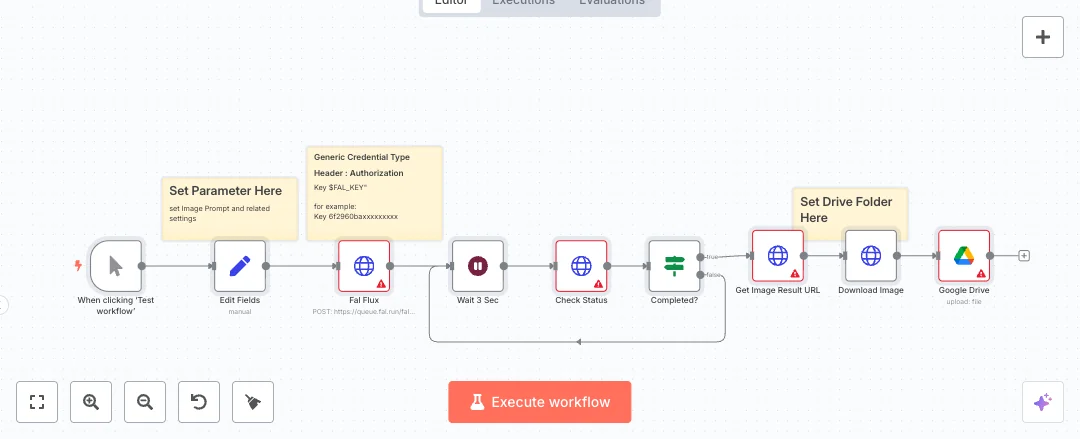
The flow starts when you click Test workflow. A field editor sets the prompt, size, steps, and guidance. An HTTP request sends the job to FAL AI. The system waits three seconds and checks job status in a loop. When ready, it grabs the result URL, downloads the first image, and places the file in the folder you choose in Google Drive. Header auth secures FAL AI requests and OAuth2 connects Google Drive. This setup removes busywork and keeps every asset in the right place.
You need a FAL AI API key and a Google Drive account with folder access. Pick your folder and tune prompt settings to match your brand or campaign. Expect faster creative output and fewer context switches. Use it for ad variations, social content batches, mood boards, and concept images during reviews.

Tools Required
What this workflow does?
- Manual run with a test button so you generate assets on demand
- Editable fields for prompt, width, height, steps, and guidance
- HTTP requests start jobs on FAL AI and read the job status
- Wait and If nodes poll the status until the image is ready
- Result URL is fetched and the first image is downloaded as binary data
- Google Drive upload sends the file to a specific folder you choose
- Credentials use header auth for FAL AI and OAuth2 for Google Drive
What are the benefits?
- Reduce manual work from 10 minutes to 1 minute per image
- Automate 90% of repetitive download and upload steps
- Ensure 100% correct folder placement in Google Drive
- Handle up to 50 images per hour with reliable polling
- Connect FAL AI and Google Drive without switching tools
How to set this up?
- Import the template into n8n: Create a new workflow in n8n > Click the three dots menu > Select 'Import from File' > Choose the downloaded JSON file.
- You'll need accounts with FAL AI and Google Drive. See the Tools Required section above for links to create accounts with these services.
- In the n8n credentials manager, create a new HTTP Header Auth credential for FAL AI. Set Header Name to Authorization and Header Value to Key YOUR_FAL_KEY. Save the credential.
- Create a Google Drive OAuth2 credential in n8n Cloud. Click Create new credential, choose Google Drive, and follow the on screen steps to grant access to your Google account.
- Open the Fal Flux node and select your FAL AI header credential in the Credential to connect with dropdown.
- Open the Check Status and Get Image Result URL nodes and select the same FAL AI credential so all requests are authorized.
- Open the Google Drive node and select your Google Drive credential. Choose the target folder. Confirm the folder ID is correct.
- Open the Edit Fields node and set your Prompt, Width, Height, Steps, and Guidance values. Adjust the file name if you want a specific naming format.
- Click Test workflow to run. Watch the execution view. The Wait and Check Status nodes will loop until the job is complete, then the image will be downloaded and uploaded to Drive.
- Confirm the file appears in your chosen Google Drive folder and the image matches your prompt and size settings.
- If you see a 401 error from FAL AI, check the Authorization format. It should be Key YOUR_FAL_KEY. If Drive upload fails, check account permissions and folder access.
- To reduce or increase polling frequency, change the Wait 3 Sec node value. Shorter waits check status more often.
- For batch use, duplicate the Edit Fields node with different prompts and run them in separate executions.
Need help or want to customize this?
Ask in the Free Futurise Community.
Similar Templates
These templates were sourced from publicly available materials across the web, including n8n’s official website, YouTube and public GitHub repositories. We have consolidated and categorized them for easy search and filtering, and supplemented them with links to integrations, step-by-step setup instructions, and personalized support in the Futurise community. Content in this library is provided for education, evaluation and internal use. Users are responsible for checking and complying with the license terms with the author of the templates before commercial use or redistribution.Where an original author was identified, attribution has been provided. Some templates did not include author information. If you know who created this template, please let us know so we can add the appropriate credit and reference link. If you are the author and would like this template removed from the library, email us at info@futurise.com and we will remove it promptly.
