Get Started
Screenshot of n8n workflow
FREE TEMPLATE
Generate Anthropic SEO Keyword Research
11
Views
0
Downloads
15
Nodes
Download Template
Free
Preview Template
Utility Rating
6 / 10
Business Function
Marketing
Automation Orchestrator
n8n
Integrations
Anthropic
Trigger Type
Manual trigger
Approx setup time ≈ 25 min
Need help setting up this template?
Ask in our free Futurise community
About
Community
Courses
Events
Members
Templates

How to Generate Anthropic SEO Keyword Research?

Leon Petrou
FREE TEMPLATE
Generate Anthropic SEO Keyword Research
11
Views
0
Downloads
15
Nodes
Download Template
Free
Preview Template
Utility Rating
6 / 10
Business Function
Marketing
Automation Orchestrator
n8n
Integrations
Anthropic
Trigger Type
Manual trigger
Approximate setup time ≈ 25 minutes
Need help setting up this template?
Ask in our free Futurise community

Description

Turn your ideal customer profile into a ready to use list of seed keywords. Great for marketers who need quick keyword ideas for content, ads, and on page SEO. Run it on demand during planning sessions or when launching a new offer.

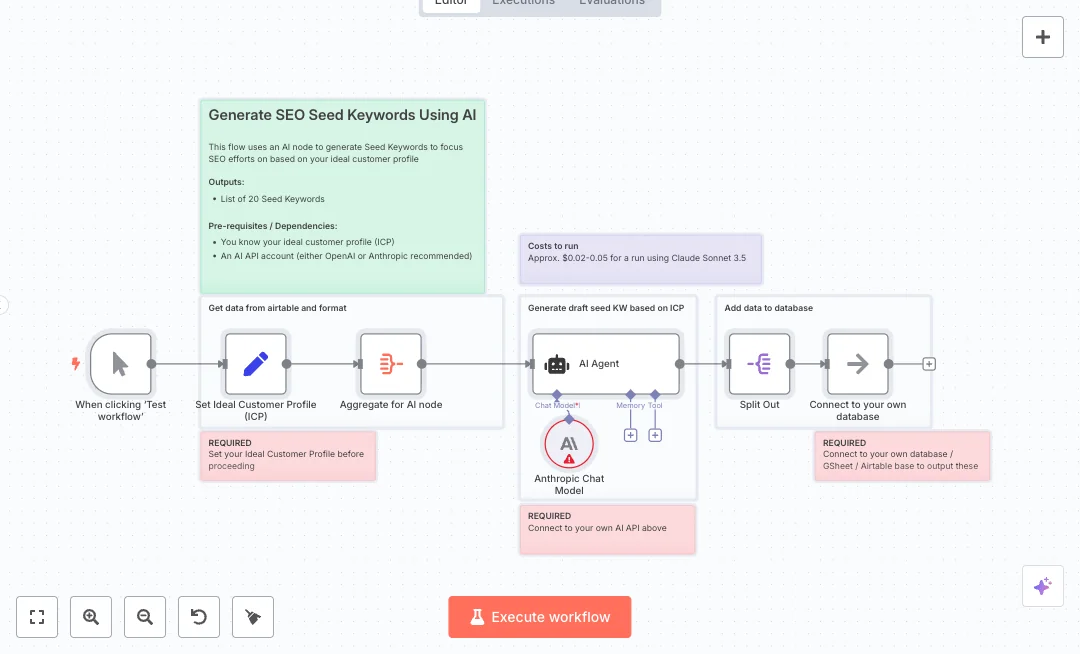
Here is how it works. You click run to start. The Set node holds your ideal customer profile details. The Aggregate node bundles that input for the AI. The Anthropic Chat Model powers an AI Agent that creates a list of about 20 seed keywords. The Split Out node breaks the AI answer into individual items so each keyword can be stored or reviewed. A placeholder node marks where you can send the list to your own database or sheet.

To use it, you need an Anthropic API key and a clear ideal customer profile. Expect a run cost of a few cents and a fast result that replaces long brainstorming. Use it to plan blog topics, name ad groups, and find early content clusters for a new site or product.

Copy link

Tools Required

n8n
Sign up
$24 / mo or $20 / mo billed annually to use n8n in the cloud. However, the local or self-hosted n8n Community Edition is free.
Anthropic
Sign up
Pay-as-you-go: Claude 3 Haiku at $0.25 per 1M input tokens and $1.25 per 1M output tokens

What this workflow does?

  • Manual trigger lets you run on demand during planning
  • Set node stores your ideal customer profile details
  • Aggregate node combines inputs for clean AI prompts
  • Anthropic Chat Model generates about 20 seed keywords
  • AI Agent orchestrates the prompt and returns structured output
  • Split Out turns the AI answer into individual keyword items
  • Database placeholder shows where to connect Airtable, Google Sheets, or SQL

What are the benefits?

  • Reduce keyword brainstorming from 2 hours to 5 minutes
  • Automate 80 percent of initial keyword research for new offers
  • Keep ideas consistent with your target audience and product focus
  • Send each keyword as a separate record to your own system
  • Lower research costs with runs that cost only a few cents

How to set this up?

  1. Import the template into n8n: Create a new workflow in n8n > Click the three dots menu > Select 'Import from File' > Choose the downloaded JSON file.
  2. You'll need accounts with Anthropic. See the Tools Required section above for links to create accounts with these services.
  3. Create an Anthropic API key in your Anthropic account. Copy the key and store it in a secure place.
  4. Open the Anthropic Chat Model node in n8n. In the Credential to connect with dropdown, click Create new credential, select API Key, paste your key, name the credential clearly, and save.
  5. Open the Set Ideal Customer Profile node. Replace the placeholder fields with your product, audience, and problem details. Keep text concise and clear.
  6. Open the AI Agent node. Make sure the instructions ask for a list of 20 seed keywords and that the final answer is an array placed in output.answer.
  7. Check the Split Out node. Confirm the field to split is output.answer so each keyword becomes its own item.
  8. Replace the Connect to your own database node with your target app, such as Airtable, Google Sheets, or a SQL node. Double click the new node, create credentials, and map the keyword field to a column.
  9. Click Test workflow. Review the Split Out items. You should see about 20 records. If you see one long string, update the AI Agent prompt to return a clean JSON array.
  10. If you get API errors, verify the Anthropic credential, check key permissions, and try again. If costs are a concern, keep prompts short and limit output to 20 items.
  11. Once results look correct, publish or run the flow on demand from the n8n editor.

Need help or want to customize this?

Similar Templates

n8n
Marketing
Automate Anthropic Content Production
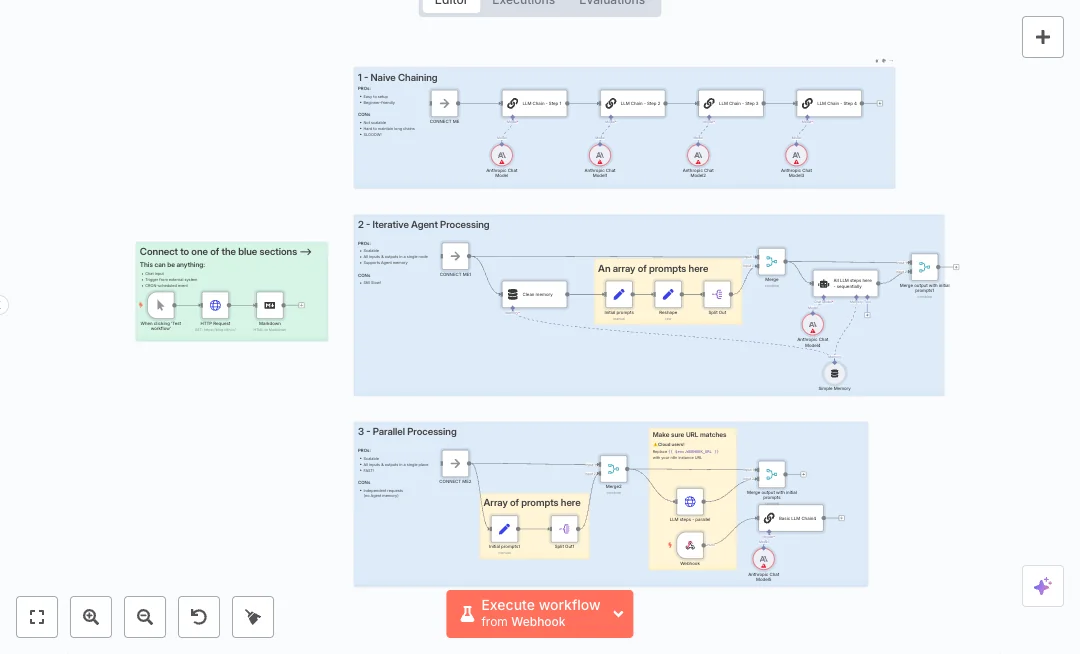
Create and scale AI content steps with a clear structure. Teams can send one request from an app or a batch of prompts and receive organized outputs for blogs, emails, or product copy. The goal is faster drafting with consistent tone and easy review. Input arrives by a manual test or a webhook. Prompts are prepared in a Set node and reshaped into a clean list of instructions. You can run four Anthropic steps in sequence with memory for context, or fan out prompts in parallel for speed. A memory node keeps the last ten turns and a clean step resets it when needed. A web page can be fetched and converted to markdown as optional source material. Merge nodes collect every result and align them with the original prompts. You need an Anthropic API key and a working webhook URL. Choose the path you prefer by connecting the labeled links to the sequential chain or the parallel block. Expect faster drafts and more consistent messages across channels. Strong fits include content calendars, email variants at scale, landing page copy, and outline to article expansion.
4 views
view
n8n
Marketing
Generate Anthropic SEO Seed Keywords
Build a focused list of seed keywords from your ideal customer profile. Great for marketing teams that want faster research and more relevant terms for content, ads, and SEO planning. The flow starts when you click Test. You enter your ICP details in a Set node. The data is combined with an Aggregate node and sent into an AI Agent that uses the Anthropic Chat Model. The agent creates about 20 seed keywords in a clean list. A Split Out node then turns the list into single items so you can store or reuse each keyword. A placeholder output step shows where to connect your database or a sheet. This design keeps your ICP as the source of truth and gives you structured results. You will need an Anthropic API key and a clear ICP description. Pick a suitable model in the Anthropic node and confirm the agent returns a simple list. Expect a cut in research time from hours to minutes with low API costs per run. Use it for content planning, ad group ideas, and new topic clusters. If you want to save the keywords, swap the placeholder with your database or a spreadsheet node.
9 views
view
n8n
Marketing
Generate Anthropic SEO Articles
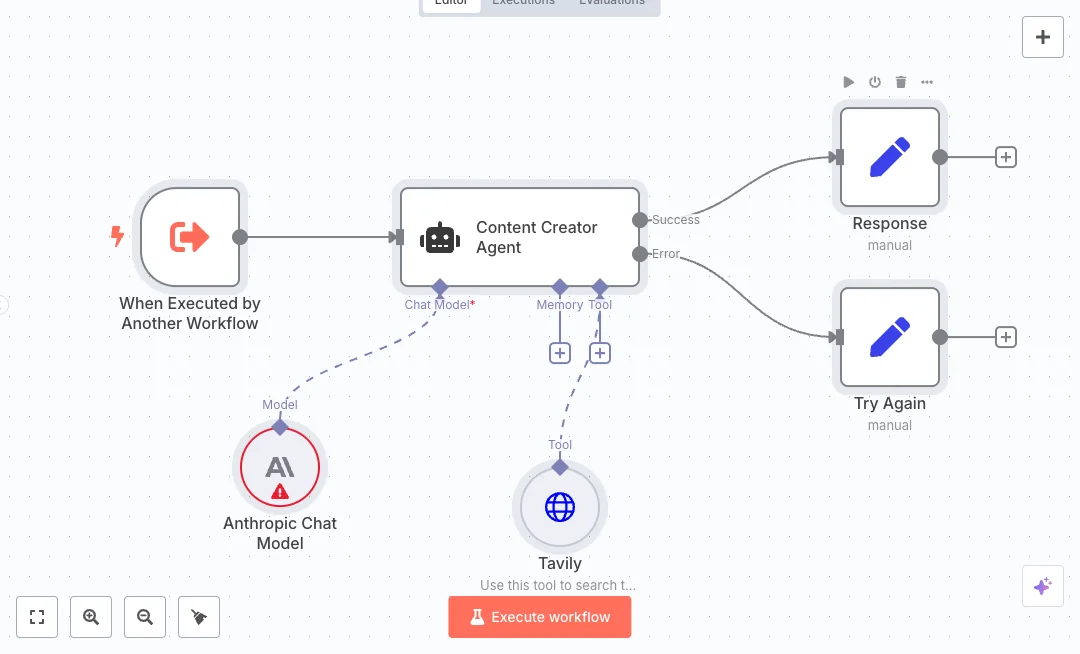
Create blog drafts on demand with an AI writer that can also look up fresh sources. It suits marketing teams that need quick, research backed articles without switching tools. The content is returned in a single field that is ready for review or publishing. An upstream workflow calls this one and passes a topic as query. The Content Creator Agent uses the Anthropic chat model to write the draft. When the model needs facts, it calls the Tavily search tool, which sends a request to the Tavily API and returns up to three results with raw content. The search runs with basic depth and pulls news sources, so the model can quote and summarize current information. The agent blends that research into the copy and outputs text. A Set node then stores the final draft in a response field, while a second Set node returns a clear error message if something fails. Provide an Anthropic API key and a Tavily API key, and make sure your caller workflow sends the query field. Expect a large cut in first draft time and more consistent tone across posts. Great for content calendars, SEO briefs, and agency production that needs fast turnarounds. Results usually arrive in under a minute and often need only light edits.
12 views
view
See More Templates

These templates were sourced from publicly available materials across the web, including n8n’s official website, YouTube and public GitHub repositories. We have consolidated and categorized them for easy search and filtering, and supplemented them with links to integrations, step-by-step setup instructions, and personalized support in the Futurise community. Content in this library is provided for education, evaluation and internal use. Users are responsible for checking and complying with the license terms with the author of the templates before commercial use or redistribution.Where an original author was identified, attribution has been provided. Some templates did not include author information. If you know who created this template, please let us know so we can add the appropriate credit and reference link. If you are the author and would like this template removed from the library, email us at info@futurise.com and we will remove it promptly.