


How to Connect Baserow and OpenAI for PDF Data Entry?


Description
Turn PDF files into structured table data without manual typing. When someone updates a row or adds a new field, the system reads the PDF and fills the right cells based on simple prompts. Ideal for teams that collect forms, contracts, or reports in Baserow.
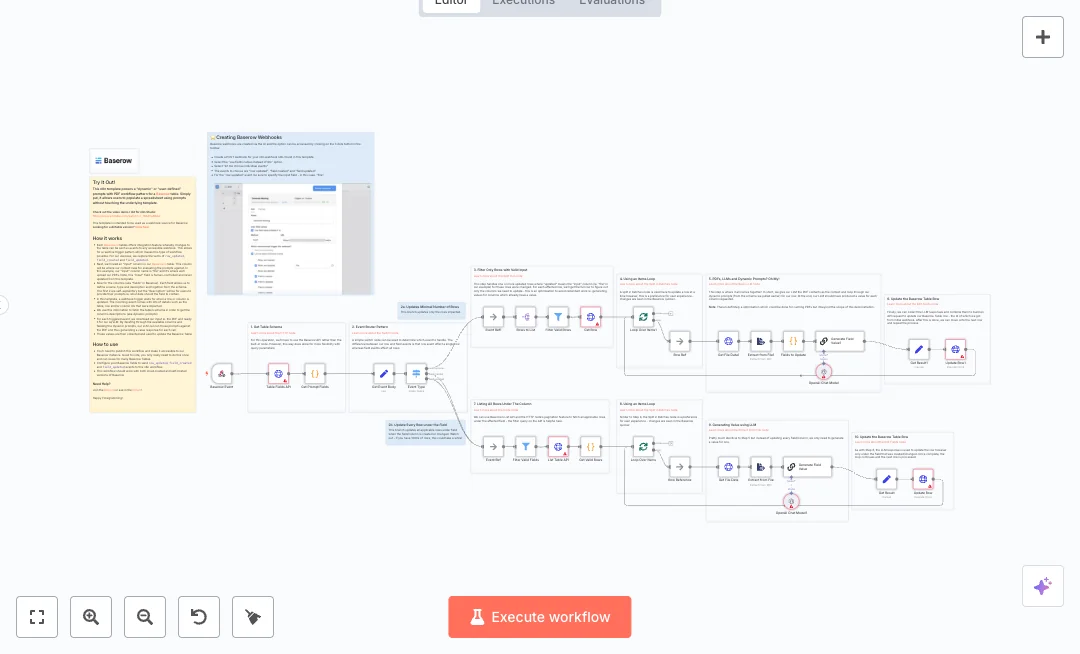
An incoming webhook listens for Baserow events like row updates and field changes. The flow pulls the table schema to read field descriptions, which act as prompts. It downloads the file from the row, extracts the PDF text, and sends the text with each prompt to OpenAI to generate answers. Only empty or changed fields are processed, and updates run one row at a time for fast feedback. There are two paths. One path updates only the affected rows, and the other can refresh all rows when a field is created or changed.
To run it, you need a Baserow table with a file column and clear descriptions on the fields you want filled. Connect your Baserow API token and OpenAI key, publish the webhook, then point Baserow events to it. Expect less data entry, quicker turnarounds, and consistent values across many rows.

Tools Required
Video Tutorial
What this workflow does?
- Webhook listener captures Baserow row updates and field changes.
- Switch router separates row events from field events to limit or expand updates.
- Table schema fetch reads field descriptions and treats them as dynamic prompts.
- List and filter steps pull only valid rows and skip items without a file.
- PDF extractor converts uploaded documents into text for the model.
- OpenAI node generates values per field from the PDF context and prompts.
- Split in batches processes one row at a time for faster visible updates.
- HTTP PATCH writes results back to the same rows using user field names.
What are the benefits?
- Reduce manual work from hours per batch to minutes
- Automate up to 80 percent of document data entry
- Improve data quality by 30 percent by using clear prompts and skipping filled cells
- Handle thousands of rows with controlled batch updates
- Connect Baserow and OpenAI in one flow with no context switching
- Add new fields without rebuilding. Field descriptions become prompts
How to set this up?
- Import the template into n8n: Create a new workflow in n8n > Click the three dots menu > Select 'Import from File' > Choose the downloaded JSON file.
- You'll need accounts with Baserow and OpenAI. See the Tools Required section above for links to create accounts with these services.
- In your Baserow account, create a personal API token with access to the target database and table. Copy the token.
- In the n8n credentials manager, create a new HTTP Header Auth credential for Baserow. Add a header named Authorization with the value Token your_api_token. Save the credential.
- In your OpenAI account, create an API key from the API settings page. In n8n, create a new OpenAI credential and paste the key. Save the credential.
- Open the HTTP Request nodes that call Baserow, such as Table Fields API, List Table API, Get Row, and Update Row. In the Credential to connect with field, select the Baserow credential you created.
- Open the OpenAI Chat Model nodes. Choose your model, set temperature if needed, and select your OpenAI credential.
- Ensure your Baserow table has a file column. The workflow expects a field named File. If your column name is different, update the Get File Data nodes to match your field name.
- In Baserow, write clear prompts in the Description of each field you want the model to fill. Short and direct prompts work best.
- Publish the n8n workflow. Copy the Production URL from the Webhook node and keep it handy.
- In your Baserow table settings, add a webhook that sends row_updated, field_created, and field_updated events to the n8n Webhook URL. Save the webhook.
- Test the setup by uploading a PDF to the File column on a row or by editing a field description. Check n8n executions for results and confirm the row values update.
- Troubleshoot common issues. If no updates occur, verify the file field name mapping, run the Table Fields API node to confirm credentials, check OpenAI quota, and ensure your PDFs are not too large. Adjust pagination settings if you have very large tables.
Need help or want to customize this?
Ask in the Free Futurise Community.
Similar Templates
Credits: YouTube video - these templates were sourced from publicly available materials across the web, including n8n’s official website, YouTube and public GitHub repositories. We have consolidated and categorized them for easy search and filtering, and supplemented them with links to integrations, step-by-step setup instructions, and personalized support in the Futurise community. Content in this library is provided for education, evaluation and internal use. Users are responsible for checking and complying with the license terms with the author of the templates before commercial use or redistribution. If you are the author and would like this template removed from the template library, email us at info@futurise.com and we will remove it promptly.
