


How to Automate Supabase Social Link Enrichment?


Description
Find social media profiles for a list of companies without manual research. The workflow reads websites from your database, visits the pages, and captures links to profiles like LinkedIn, Twitter, and Facebook. It fits marketing and sales teams that need clean social handles for account and lead enrichment.
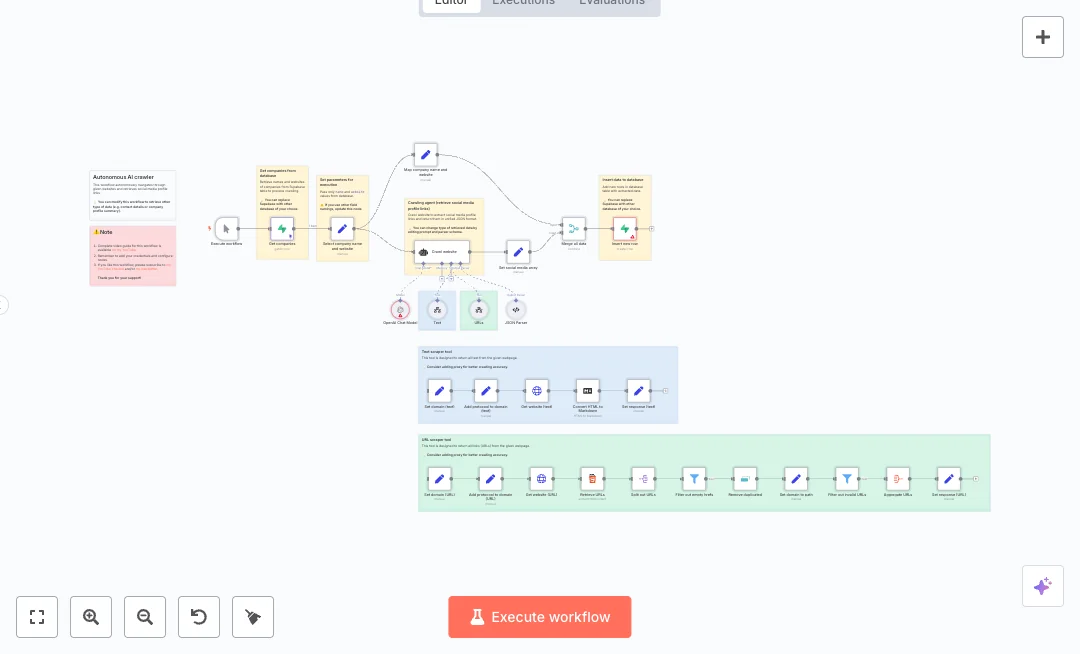
Execution starts with a manual run. A Supabase node pulls company name and website, then an AI crawler uses two tools to fetch page text and all links. An OpenAI model extracts only social profile URLs and returns structured JSON that matches a defined schema. A URL pipeline splits results, removes duplicates, fixes missing protocols, filters invalid links, and aggregates clean outputs. The data is merged with company details and inserted back into a Supabase table. Optional HTML to Markdown conversion helps you review page content when needed.
You need working Supabase tables and an OpenAI API key. Map your name and website fields, review the AI prompt and parser schema, and test with a few domains to confirm results. Expect faster list enrichment, better data quality, and on demand runs whenever your input table updates. Use it for prospect research, partner checks, and profile cleanup across many sites.

Tools Required
Video Tutorial
What this workflow does?
- Pull company names and websites from a Supabase table and write results to a separate output table.
- Use an OpenAI Chat Model with temperature set to zero to extract social profile links reliably.
- Invoke two scraping tools to get page text and all URLs from each website for richer signals.
- Enforce a strict JSON schema so the output includes a clean social_media array with platform and url.
- Process links with split, remove duplicates, add protocol, filter invalid URLs, and aggregate steps.
- Merge AI results with company records and insert rows back into the database automatically.
- Convert HTML to Markdown for quick human review of crawled text when debugging.
- Run on demand with a manual trigger for controlled, batch processing.
What are the benefits?
- Reduce manual research from hours to minutes per batch
- Automate up to 90% of social profile lookups
- Improve data quality by removing invalid and duplicate links
- Handle 10 times more domains with the same team size
- Connect Supabase and OpenAI in one consistent flow
How to set this up?
- Import the template into n8n: Create a new workflow in n8n > Click the three dots menu > Select 'Import from File' > Choose the downloaded JSON file.
- You'll need accounts with Supabase and OpenAI. See the Tools Required section above for links to create accounts with these services.
- In your Supabase project, create an input table (for example companies_input) with at least name and website columns, and an output table (for example companies_output) with fields for company_name, website, and a JSON field for social_media.
- Add a few sample rows to the input table so you can test the run with real domains.
- In the n8n credentials manager, create Supabase credentials. Then open the Get companies and Insert new row nodes, choose the credential, and verify the correct project URL and key are set.
- In the n8n credentials manager, create an OpenAI API Key credential. Double click the OpenAI Chat Model node, select Create new credential, and paste your API key from the OpenAI API page.
- Open the Select company name and website node and confirm it passes only the name and website fields. If your column names differ, update the field mapping.
- Review the AI prompt and the JSON Parser schema. Make sure the social_media array fields match what you want to store, such as platform and url.
- Click Execute workflow to run a test. Watch the Crawl website and Set social media array nodes to confirm the model returns the expected links.
- Inspect the URL pipeline nodes. If off domain links appear, adjust Filter out invalid URLs to keep only links from the target domain.
- Open your Supabase output table and confirm new rows were inserted with a populated social_media array. If empty, check that Add protocol and Remove duplicates are working as expected.
- If some sites block requests, consider adding a proxy as hinted in the tool notes, and rerun a small batch to validate improvements.
Need help or want to customize this?
Ask in the Free Futurise Community.
Similar Templates
Credits: YouTube video by workfloows. YouTube channel - these templates were sourced from publicly available materials across the web, including n8n’s official website, YouTube and public GitHub repositories. We have consolidated and categorized them for easy search and filtering, and supplemented them with links to integrations, step-by-step setup instructions, and personalized support in the Futurise community. Content in this library is provided for education, evaluation and internal use. Users are responsible for checking and complying with the license terms with the author of the templates before commercial use or redistribution. If you are the author and would like this template removed from the template library, email us at info@futurise.com and we will remove it promptly.
