


How to Automate Notion Sales Call Records from AI Summaries?


Description
Turn AI summaries from sales calls into clear records inside Notion. The workflow captures objections, competitor mentions, integration needs, and use cases, and updates the call page with a short summary. It helps sales and revenue teams move faster and keep data consistent without copy and paste.
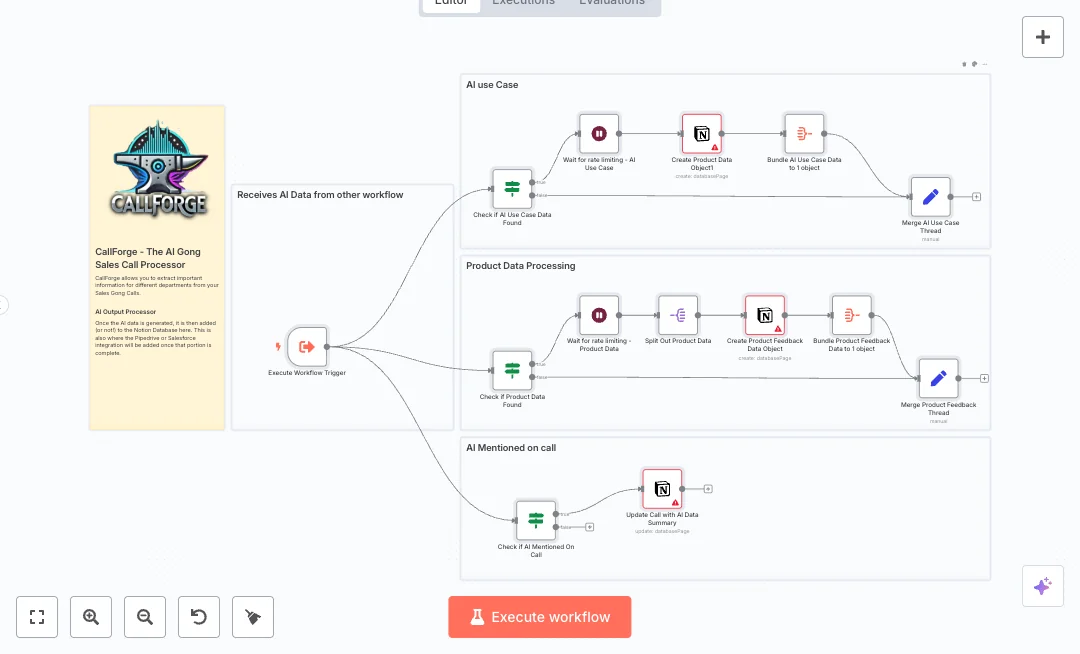
Triggered by another workflow, it receives structured AI output and a Notion page id for the call. If nodes check for each data type. When items exist, Split Out nodes break lists into single items, Set formats tags, and Aggregate nodes bundle data before writing. Notion nodes create pages in dedicated databases for competitors, integrations, and use cases, while the call page gets an objection summary. A direct HTTP request updates tags when needed. Wait nodes pause writes to handle Notion rate limits, and Merge nodes bring the threads back together.
You will need a Notion workspace, API access, and databases with matching property names. The upstream workflow should send the call page id, a title, and AIoutput blocks for objections, integrations, competitors, and use cases. Expect faster notes, cleaner reporting, and better handoffs to product and marketing. Many teams can cut manual entry from about 45 minutes to under 5 minutes per call.

Tools Required
What this workflow does?
- Execute Workflow Trigger receives AI output and call page id from an upstream workflow.
- If checks detect the presence of objections, integrations, competitors, and use cases before any write.
- Split Out nodes loop through lists so each item is handled cleanly.
- Set formats tag data so properties match Notion fields.
- Aggregate Bundle nodes group items to minimize writes.
- Notion nodes create pages in Competitors, Integrations, and Use Cases databases and update the call page.
- HTTP Request adds or updates tags directly when a custom call to Notion API is required.
- Wait nodes pause execution to respect Notion rate limits and prevent errors.
- Merge nodes rejoin parallel threads so the run finishes in a clean state.
What are the benefits?
- Reduce manual note work from 45 minutes to 5 minutes per call
- Streamline Notion updates by 80 percent with one pass write
- Improve data consistency by 90 percent with standard fields
- Handle up to 10 times more call outputs with rate limit control
- Connect sales notes and product feedback in one Notion hub
How to set this up?
- Import the template into n8n: Create a new workflow in n8n > Click the three dots menu > Select 'Import from File' > Choose the downloaded JSON file.
- You'll need accounts with Notion. See the Tools Required section above for links to create accounts with these services.
- In Notion, create or identify four databases: Calls, Competitors, Integrations, and Use Cases. Add properties that match the node mappings such as title, select, and rich text fields.
- In the n8n credentials manager, open any Notion node, choose Credential to connect with, click Create new credential, then follow the on screen steps to authorize your Notion workspace. Share each target database with the Notion integration.
- Open the Create Competitors in DB node and set the Database ID to your Competitors database. Map fields like Competitor Status select and Summary rich text to your property names.
- Open the Create Integrations node and set the Database ID to your Integrations database. Map Name title, IntegrationStatus select, and any notes fields to your schema.
- Open the Create Use Cases node and set the Database ID and property names to match your Use Cases database.
- Open the Update Notion Call object with AI data node. Confirm the Page ID expression points to the call page id sent by your upstream workflow. Adjust the property name for Objection Summary to match your Calls database.
- Review the Wait nodes. If you often hit rate limits, increase the wait time so writes to Notion remain stable.
- From your upstream workflow, pass a payload that includes metaData.title, notionData[0].id for the call page, and AIoutput blocks for Objection, Integrations, Competitors, and Use Cases.
- Run a test by executing this workflow with a sample payload. Check Notion to confirm new pages are created and the call page was updated with the objection summary and tags.
- If tags do not appear, verify the HTTP Request node headers and property names match your Notion setup, and confirm the database is shared with the integration.
Need help or want to customize this?
Ask in the Futurise Pro Community.
Similar Templates
These templates were sourced from publicly available materials across the web, including n8n’s official website, YouTube and public GitHub repositories. We have consolidated and categorized them for easy search and filtering, and supplemented them with links to integrations, step-by-step setup instructions, and personalized support in the Futurise community. Content in this library is provided for education, evaluation and internal use. Users are responsible for checking and complying with the license terms with the author of the templates before commercial use or redistribution.Where an original author was identified, attribution has been provided. Some templates did not include author information. If you know who created this template, please let us know so we can add the appropriate credit and reference link. If you are the author and would like this template removed from the library, email us at info@futurise.com and we will remove it promptly.
