


How to Automate Notion Knowledge Chat Support?


Description
Turn your Notion knowledge base into a chat assistant that answers questions with trusted content. New or edited pages are indexed automatically, so answers stay fresh. Built for support teams and operations that need quick, accurate replies.
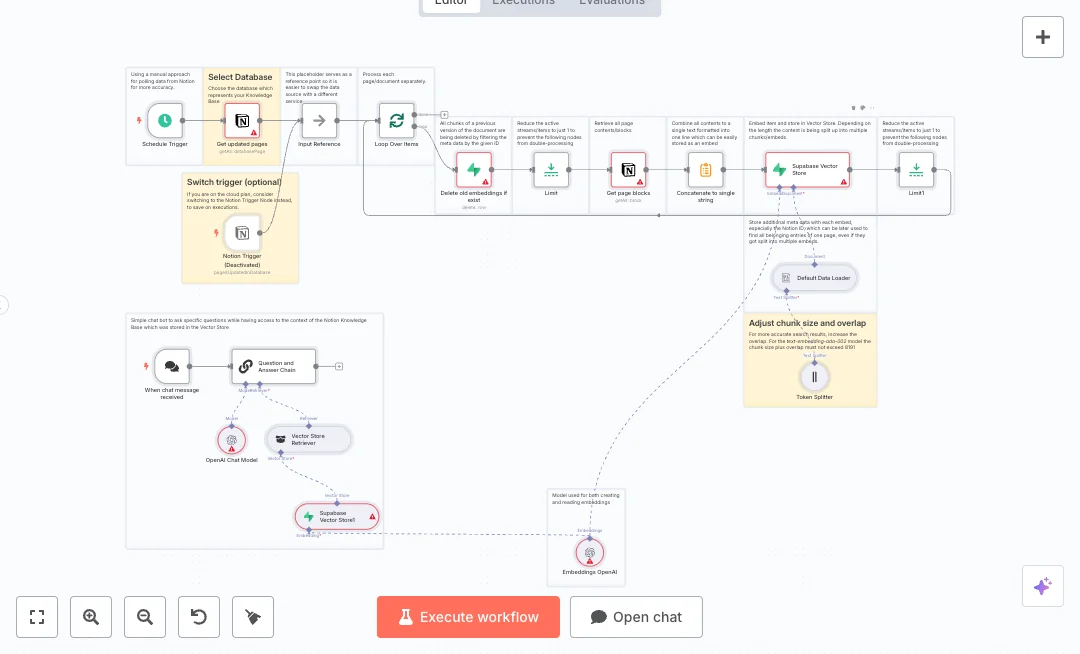
Updates arrive from a Notion database event and a safety schedule. The flow gathers every block on the page, joins the text, splits it into 500 token chunks, and adds IDs as metadata. Old vectors are removed in Supabase, then new OpenAI embeddings are saved to a vector store. A public chat endpoint receives questions, retrieves the best chunks from Supabase, and uses an OpenAI chat model to form a clear answer.
You will need a Notion database, an OpenAI key, and a Supabase project with a documents table. Expect faster answers and less ticket back and forth, often cutting search time from minutes to seconds. Great for product FAQs, internal SOPs, onboarding notes, and team policies.

Tools Required
What this workflow does?
- Captures updates with a Notion event trigger and a backup schedule
- Retrieves every page block with nested fetch to cover full content
- Concatenates page text and splits it into 500 token chunks for better search
- Adds page ID and name as metadata for precise version control
- Deletes old embeddings in Supabase using a metadata filter before reindexing
- Creates OpenAI embeddings and stores them in a Supabase vector table
- Public chat endpoint accepts questions and returns answers
- Retrieves top matches from Supabase and uses an OpenAI chat model to answer
- Limit nodes prevent double processing when multiple streams are active
- Batch loop processes many updated pages without manual work
What are the benefits?
- Reduce knowledge search time from 10 minutes to under 30 seconds
- Automate 100 percent of Notion to vector updates after each edit
- Eliminate duplicate embeddings by clearing old vectors before each save
- Handle hundreds of pages and many chat users with a scalable vector store
- Connect Notion, Supabase, and OpenAI in one reliable flow
How to set this up?
- Import the template into n8n: Create a new workflow in n8n > Click the three dots menu > Select 'Import from File' > Choose the downloaded JSON file.
- You'll need accounts with Notion, OpenAI and Supabase. See the Tools Required section above for links to create accounts with these services.
- In the n8n credentials manager, create a Notion credential. Double click any Notion node, choose 'Create new credential', and follow the on screen steps. In Notion, share the target database with this integration so it has read access.
- Create an OpenAI credential. Double click the OpenAI node, click 'Create new credential', and paste your API key from the OpenAI API page.
- Create a Supabase credential. In Supabase, copy the project URL and service role key. In n8n, open the Supabase nodes, choose 'Create new credential', and enter the URL and key.
- Open the Notion Trigger node and select your Knowledge Base database. Keep the event for page updates and the poll every minute as configured.
- Check the Get updated pages node filter. It uses last edited time equals now minus 1 minute. Keep this in sync with your schedule trigger interval.
- Verify Supabase table settings. Ensure the table name is documents and that your schema includes fields for content, metadata, and an embedding vector. The delete step filters by metadata id to remove older chunks.
- Adjust the Token Splitter if needed. Chunk size is 500 tokens. Increase overlap for better recall while keeping model limits in mind.
- Confirm the OpenAI Chat Model is set to your preferred model. gpt 4o is selected. You can change it if you have different access.
- Activate the workflow. Edit a Notion page and confirm new rows appear in Supabase while older rows for that page are removed.
- Test the chat endpoint. Copy the public URL from the chat trigger, send a question that exists in your Notion docs, and check the answer quality.
- Troubleshoot common issues. If Notion updates are missed, ensure the database is shared with the integration. If Supabase returns 401, recheck the service role key. If answers are weak, increase chunk overlap or retriever results and verify the delete filter matches your metadata id.
Need help or want to customize this?
Ask in the Futurise Pro Community.
Similar Templates
These templates were sourced from publicly available materials across the web, including n8n’s official website, YouTube and public GitHub repositories. We have consolidated and categorized them for easy search and filtering, and supplemented them with links to integrations, step-by-step setup instructions, and personalized support in the Futurise community. Content in this library is provided for education, evaluation and internal use. Users are responsible for checking and complying with the license terms with the author of the templates before commercial use or redistribution.Where an original author was identified, attribution has been provided. Some templates did not include author information. If you know who created this template, please let us know so we can add the appropriate credit and reference link. If you are the author and would like this template removed from the library, email us at info@futurise.com and we will remove it promptly.
