


How to Automate GitLab AI Code Review Reporting?


Description
Turn every GitLab merge request into a clear QA report powered by AI. The flow reviews code changes, scores risk, and sends results to the right people. It helps dev and QA teams move faster with less back and forth.
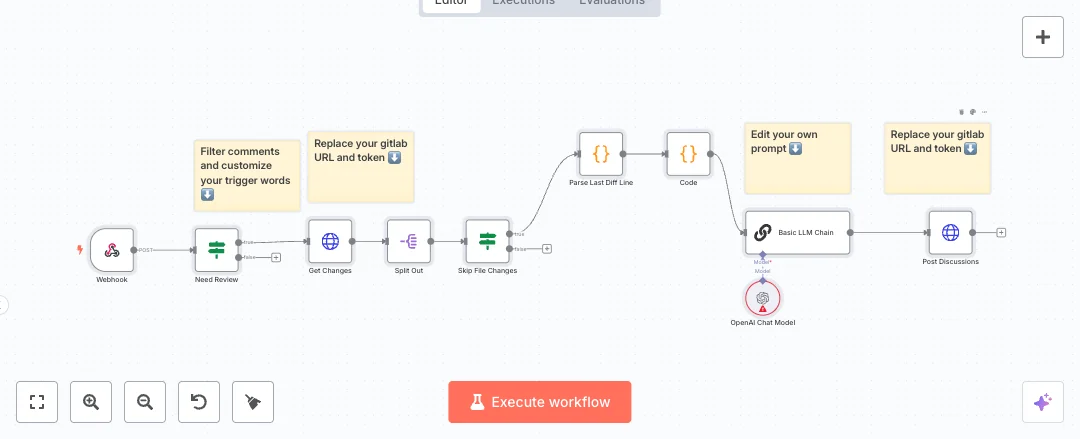
When a merge request is opened or updated, the GitLab trigger fires. The flow pulls the diff from GitLab, checks that changes exist, and passes the diff to Anthropic Claude. A strict output parser shapes the answer into Risk Level, Summary, Issues, Recommendations, and Test Cases. An auto fixing parser cleans any format errors so reports stay structured. A code node builds the email list for each project, Gmail sends an HTML report, and the same summary is posted back as a comment on the merge request.
Setup needs GitLab API access, an Anthropic key, and a Gmail account. Teams can expect the first pass review to drop from around half an hour to a few minutes, with fewer missed edge cases due to suggested test cases. Great for engineering managers, QA leads, and development teams that want consistent reviews across many projects. It also scales well because the flow can handle many merge requests in a day without extra manual work.

Tools Required
What this workflow does?
- GitLab event trigger starts on new or updated merge requests so reviews run at the right time.
- HTTP request pulls the exact diff from GitLab to analyze real code changes.
- If check stops the run when no changes are found to avoid noise.
- Anthropic Claude creates a structured summary with risk, issues, recommendations, and test cases.
- Structured and auto fixing parsers enforce clean JSON shaped output for reliable email and comments.
- Code node builds a project based distribution list for dev and QA teams.
- Gmail node sends an HTML report to the distribution list for quick action.
- HTTP request posts the same summary back to the merge request as a comment for full visibility.
- Merge node supports multiple GitLab triggers so several repos or paths can feed the same flow.
What are the benefits?
- Reduce first pass review time from about 30 minutes to under 5 minutes per merge request
- Automate around 70 percent of initial QA checks with a structured AI report
- Improve consistency of risk labels and test ideas across teams
- Connect GitLab, Anthropic, and Gmail with no manual copy and paste
- Scale to dozens of merge requests per day without extra effort
- Cut missed feedback by posting results directly in the merge request thread
How to set this up?
- Import the template into n8n: Create a new workflow in n8n > Click the three dots menu > Select 'Import from File' > Choose the downloaded JSON file.
- You'll need accounts with Anthropic, GitLab and Gmail. See the Tools Required section above for links to create accounts with these services.
- In the n8n credentials manager, create a GitLab credential. If unsure, double click any GitLab Trigger node, open the Credential to connect with dropdown, click Create new credential, then follow the on screen steps and paste a GitLab personal access token with API scope.
- Open each GitLab Trigger node and select your GitLab credential. Set the project to your repository and make sure the merge_requests event is selected. Save the node.
- Activate the workflow or use Listen for events if available. In your GitLab project, verify a webhook was created and returns status 200. Use the Test button in GitLab to send a sample merge request event.
- Configure the Extract Diff HTTP Request node. Replace the Authorization header with your GitLab personal access token, or attach an HTTP Request credential that uses a Bearer token.
- Configure the Comment Back on MR HTTP Request node with a valid GitLab token that can post comments on merge requests in the project.
- Create an Anthropic credential in n8n. Double click the Anthropic Chat Model nodes, choose Create new credential, then paste your Anthropic API key from the Anthropic account API page.
- Set up Gmail OAuth in n8n. Double click the Send to DL Email Notification node, choose Create new credential, sign in to your Google account, and allow email send permissions.
- Open the Distribution List Generator code node and replace the sample project to email mappings with your team addresses and project keys.
- Run a test by opening or updating a merge request in GitLab. Check that an email arrives with the AI report and that a comment with risk, issues, recommendations, and test cases appears on the merge request.
- If nothing triggers, check the workflow executions panel in n8n and the webhook logs in GitLab. For 401 errors, update tokens or scopes. For email issues, reauthorize the Gmail credential. For empty AI responses, confirm your Anthropic quota and model name.
Need help or want to customize this?
Ask in the Free Futurise Community.
Similar Templates
Credits: Author: vishalkumar1. Brand reference: Quantana - these templates were sourced from publicly available materials across the web, including n8n’s official website, YouTube and public GitHub repositories. We have consolidated and categorized them for easy search and filtering, and supplemented them with links to integrations, step-by-step setup instructions, and personalized support in the Futurise community. Content in this library is provided for education, evaluation and internal use. Users are responsible for checking and complying with the license terms with the author of the templates before commercial use or redistribution. If you are the author and would like this template removed from the template library, email us at info@futurise.com and we will remove it promptly.
