


How to Automate GitHub PR to Pipedrive Lead Tracking?


Description
New pull requests in GitHub are logged as notes on matching contacts in Pipedrive. Sales and account teams get instant context on who is engaging with the code, without asking engineers for updates. It is ideal for teams that sell to developers or manage partners who contribute to repos.
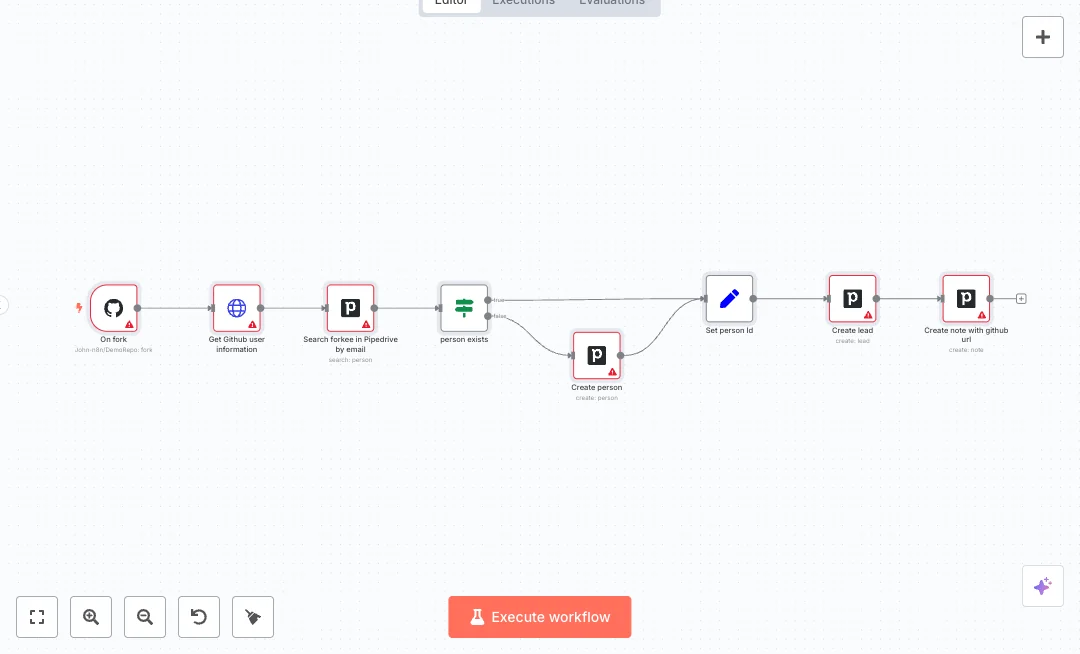
A GitHub event starts the flow when a pull request is opened. The workflow calls the GitHub API to fetch the sender profile and uses the email to search for a person in Pipedrive. If a match is found, it writes a note on that person with the pull request link. If no match is found, it does nothing. This links product usage to the CRM record so reps can see engagement history next to deals and activities.
Setup is simple with GitHub and Pipedrive credentials in n8n Cloud and a repo selection for the trigger. Expect fewer missed signals and faster follow ups because context is now in one place. Great for tracking prospects who test your SDK, customer engineers who submit fixes, or partners who open PRs on shared code.

Tools Required
What this workflow does?
- Listens for GitHub pull request events and starts the flow automatically
- Fetches the PR sender profile from the GitHub API to access email and name
- Searches Pipedrive for a matching person by email to avoid duplicates
- Checks if a person exists before writing any CRM data to keep records clean
- Creates a Pipedrive note with the exact pull request link for quick access
- Skips updates gracefully when no match is found using a NoOp branch
What are the benefits?
- Reduce manual CRM updates from 30 minutes per PR to 1 minute
- Streamline sales follow up by 70 percent with context in one place
- Eliminate 90 percent of copy paste errors in CRM notes
- Connect GitHub and Pipedrive seamlessly to unify activity data
- Improve visibility of developer engagement across the sales team
How to set this up?
- Import the template into n8n: Create a new workflow in n8n > Click the three dots menu > Select 'Import from File' > Choose the downloaded JSON file.
- You'll need accounts with GitHub and Pipedrive. See the Tools Required section above for links to create accounts with these services.
- Confirm prerequisites: you have admin access to the GitHub repository, a Pipedrive account with API access, and an n8n Cloud workspace.
- Open the GitHub Trigger node in n8n. In the Credential to connect with field, click Create new credential and follow the on screen steps to connect your GitHub account.
- In the GitHub Trigger node, set the repository owner and repository name and make sure the event is pull_request.
- Open the HTTP Request node and select the same GitHub credential. Keep the URL expression that reads the sender profile. No extra headers are needed.
- Open the Pipedrive nodes. In the Credential to connect with dropdown, click Create new credential. Use your Pipedrive API token from the Pipedrive settings page and save it in n8n.
- Check the search node settings: Resource is person, Operation is search, Term uses the email from the GitHub profile, and the fields parameter is set to email.
- Verify the IF node condition that checks if name is not empty. This prevents empty matches from writing notes.
- Open the Pipedrive note node and confirm the person_id uses the found person id and the content includes the pull request URL from the trigger.
- Test end to end: open a pull request from a GitHub user whose email exists on a person in Pipedrive. Confirm a new note appears on that person with the PR link.
- Troubleshoot if needed: if no note appears, check that the GitHub user email is available, the credentials are connected, the repo is correct, and your Pipedrive domain and API token are valid.
Need help or want to customize this?
Ask in the Free Futurise Community.
Similar Templates
These templates were sourced from publicly available materials across the web, including n8n’s official website, YouTube and public GitHub repositories. We have consolidated and categorized them for easy search and filtering, and supplemented them with links to integrations, step-by-step setup instructions, and personalized support in the Futurise community. Content in this library is provided for education, evaluation and internal use. Users are responsible for checking and complying with the license terms with the author of the templates before commercial use or redistribution.Where an original author was identified, attribution has been provided. Some templates did not include author information. If you know who created this template, please let us know so we can add the appropriate credit and reference link. If you are the author and would like this template removed from the library, email us at info@futurise.com and we will remove it promptly.
