


How to Automate Calendly to KlickTipp Contact Sync?


Description
Turn every meeting into a clean contact record. New bookings and cancellations from Calendly update your contact list in KlickTipp for both invitees and guests. Great for teams that want instant follow ups and clear attendee tracking.
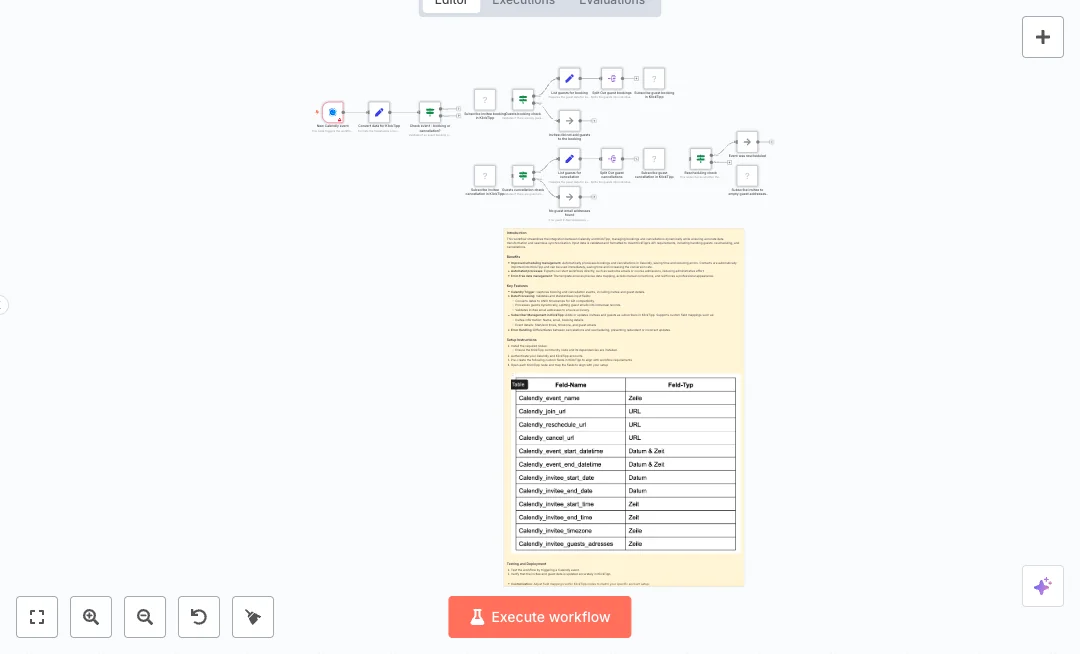
An event in Calendly starts the flow. Data is converted to the format KlickTipp expects, including UNIX timestamps and time in seconds. A decision step checks if it is a booking or a cancellation. For bookings, the invitee is added to a list with event details, and guest emails are split and added one by one. Those guest emails are also saved on the invitee contact for later. For cancellations, the invitee gets a cancellation tag, and the stored guest list is read and each guest gets the same tag. A rescheduling check prevents double updates and keeps guest data safe. Clear branches handle no guests and rescheduled events.
Setup is simple. Connect Calendly and KlickTipp, install the community node, and create the needed custom fields in KlickTipp for event info and guest emails. Map fields in each node and replace list and tag IDs with your own. Run two tests by booking and canceling an event. Expect faster handoffs, fewer mistakes, and quick segmentation by booking status. Useful for coaching calls, sales demos, interviews, and sessions with guests.

Tools Required
What this workflow does?
- Calendly event trigger listens for new bookings and cancellations in real time.
- Data conversion formats dates to UNIX timestamps and times to seconds for KlickTipp.
- Smart check routes items by booking or cancellation type.
- Invitee subscription adds or updates contacts with event details and tags.
- Guest handling lists and splits guest emails, then subscribes each guest on booking.
- Guest emails are saved on the invitee record and reused for cancellations.
- Rescheduling check avoids overwriting guest data and stops duplicate updates.
- Clear branches for no guests and rescheduled events make outcomes easy to track.
What are the benefits?
- Reduce manual contact updates from 60 minutes a day to 5 minutes
- Automate up to 90% of booking and cancellation syncing
- Improve data accuracy by 95% with standardized fields
- Connect Calendly and KlickTipp seamlessly for list and tag updates
- Handle 10x more meetings without extra admin work
- Prevent duplicate changes during reschedules
How to set this up?
- Import the template into n8n: Create a new workflow in n8n > Click the three dots menu > Select 'Import from File' > Choose the downloaded JSON file.
- You'll need accounts with Calendly and KlickTipp. See the Tools Required section above for links to create accounts with these services.
- Install the KlickTipp community node in n8n if needed: Open Settings > Community Nodes > Search for KlickTipp and install.
- Open the Calendly trigger node. In the Credential to connect with dropdown, click Create new credential and follow the on screen steps to connect your Calendly account with permissions to read scheduled events.
- Open each KlickTipp node. In the credential dropdown, click Create new credential and follow the on screen steps to connect your KlickTipp account using the required API method for your account.
- In your KlickTipp account, create custom fields for event name, start, end, timezone, and guest emails. Note their names so you can map them in n8n.
- In the Convert data for KlickTipp and Set nodes, confirm that fields point to the correct Calendly values and that dates and times are mapped as required.
- Update list ID and tag IDs in each KlickTipp node to match your account. Replace the example IDs with your real list and tag IDs.
- Enable the workflow and run a booking test in Calendly. Confirm the invitee and guests appear in KlickTipp with the correct fields and booking tag.
- Cancel the same event in Calendly. Check that the invitee and guests receive the cancellation tag and that the guest email field on the invitee is cleared unless it was a reschedule.
- If guest cancellations do not process, verify the guest email field exists in KlickTipp, that it is mapped correctly, and that the invitee record stored guest emails during booking.
- Review execution logs in n8n for any If node branches that stopped processing. Fix field mappings or credentials and retest.
Need help or want to customize this?
Ask in the Free Futurise Community.
Similar Templates
These templates were sourced from publicly available materials across the web, including n8n’s official website, YouTube and public GitHub repositories. We have consolidated and categorized them for easy search and filtering, and supplemented them with links to integrations, step-by-step setup instructions, and personalized support in the Futurise community. Content in this library is provided for education, evaluation and internal use. Users are responsible for checking and complying with the license terms with the author of the templates before commercial use or redistribution.Where an original author was identified, attribution has been provided. Some templates did not include author information. If you know who created this template, please let us know so we can add the appropriate credit and reference link. If you are the author and would like this template removed from the library, email us at info@futurise.com and we will remove it promptly.
