


How to Automate Baserow PDF Data Extraction?


Description
Turn a Baserow table into a smart data capture tool. When a row changes or a field description is updated, AI reads the linked PDF and fills the right cells. This works well for teams that store documents in Baserow and need fast, consistent data entry.
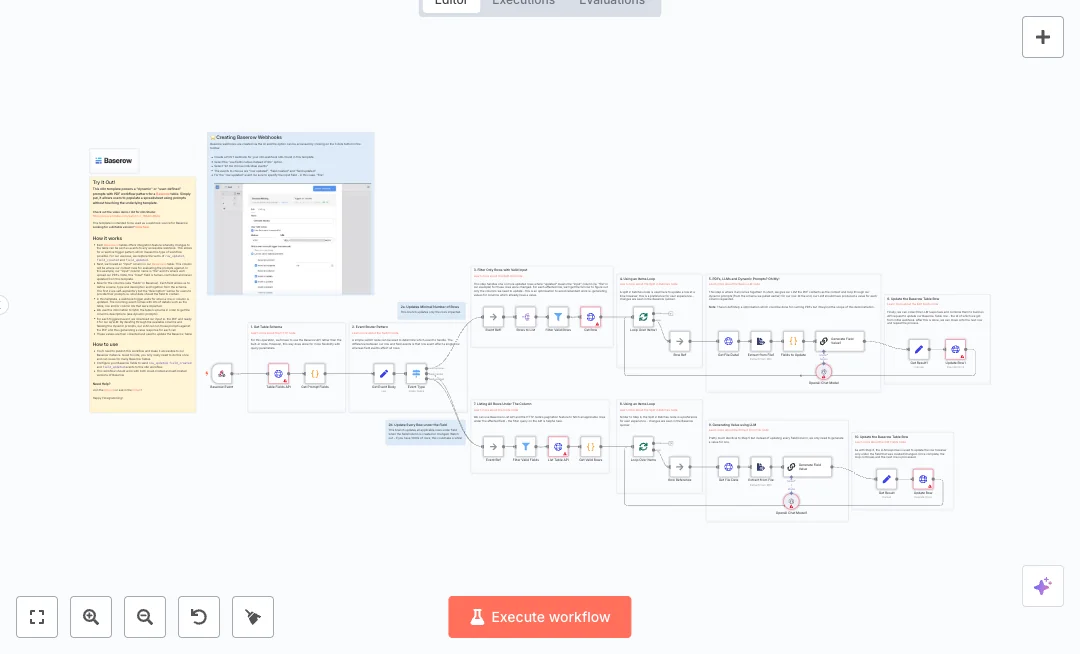
A webhook listens for Baserow events for row updates and field changes. The flow fetches the table schema to read field descriptions, which act as prompts. It downloads the PDF from the file column, extracts the text, and runs each prompt through an LLM to produce values. Filters skip fields that already have data, and batching updates one row at a time so results appear quickly without overload. The system can update only impacted rows or every row under a changed field.
You will need a Baserow API token and an OpenAI key. Point your Baserow integration to the n8n webhook and write clear prompts in each field description. Expect data work to drop from hours to minutes, with common uses like invoice headers, resume tags, and contract summaries. Publish the workflow once and reuse it across tables.

Tools Required
Video Tutorial
What this workflow does?
- Webhook captures Baserow row updates and field changes in real time
- Switch routes events to update a single row or every row under a field
- HTTP requests pull table schema and row lists with pagination
- Code nodes extract field descriptions and turn them into prompts
- File download and PDF text extraction prepare clean context for AI
- LLM node generates values for each requested field based on prompts
- Filters skip fields that already have data to avoid duplicate work
- Split in batches processes rows one at a time and updates Baserow via API
What are the benefits?
- Reduce manual data entry from hours to minutes by letting AI read PDFs and fill cells
- Automate up to 80 percent of repetitive updates with event based triggers
- Improve data quality by 30 to 50 percent by using clear prompts instead of manual typing
- Handle thousands of rows with batching that updates one row at a time
- Connect Baserow and OpenAI without building custom code
How to set this up?
- Import the template into n8n: Create a new workflow in n8n > Click the three dots menu > Select 'Import from File' > Choose the downloaded JSON file.
- You'll need accounts with Baserow and OpenAI. See the Tools Required section above for links to create accounts with these services.
- In the n8n credentials manager, create a credential for Baserow: open any HTTP Request node pointing to Baserow, choose 'Create new credential', select HTTP Header Auth, and add your Baserow API token as an Authorization header. If unsure, follow the on screen steps.
- Create an OpenAI credential in n8n: open the OpenAI node, choose 'Create new credential', paste your OpenAI API key from the OpenAI API page, and save.
- Open the Webhook trigger node and copy the Test and Production URLs. Activate the workflow to enable the Production URL.
- In your Baserow table, configure its integration to send row_updated, field_created, and field_updated events to the n8n Production webhook URL.
- Verify the HTTP Request nodes for Baserow include user_field_names set to true so field names match your table fields.
- Choose the file column that holds PDFs. Make sure users upload a valid PDF to this column. Do not rename it after setup to avoid mapping issues.
- Write clear prompts in each field description. Short and specific instructions work best, for example Extract invoice total as a number.
- Open the LLM nodes and confirm the model choice, temperature, and token limits fit your PDFs. If unsure, keep defaults and test with a small file.
- Run a test: upload a PDF to a row, edit one field description, and watch the execution. The Log should show schema fetch, PDF extract, AI output, and a row update.
- If updates fail with 401, check the Baserow token and header. If PDF text is empty, confirm the file URL is reachable and the PDF is not encrypted. If AI returns blank values, refine the field description prompt and try again.
Need help or want to customize this?
Ask in the Free Futurise Community.
Similar Templates
Credits: YouTube video - these templates were sourced from publicly available materials across the web, including n8n’s official website, YouTube and public GitHub repositories. We have consolidated and categorized them for easy search and filtering, and supplemented them with links to integrations, step-by-step setup instructions, and personalized support in the Futurise community. Content in this library is provided for education, evaluation and internal use. Users are responsible for checking and complying with the license terms with the author of the templates before commercial use or redistribution. If you are the author and would like this template removed from the template library, email us at info@futurise.com and we will remove it promptly.
